August 20, 2026: SmartDocuments Update
New Features
Smart Document Editor ⭐
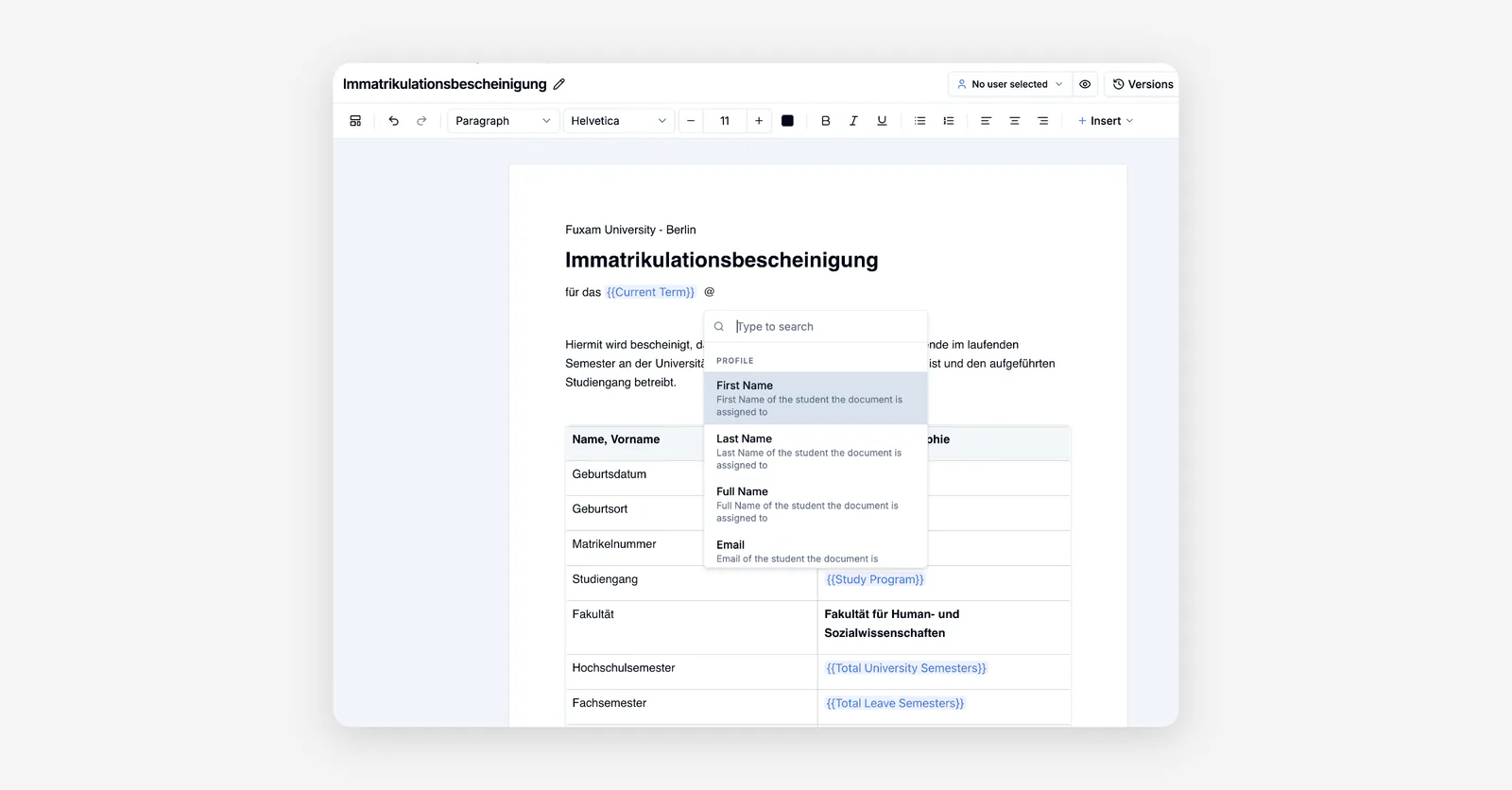
You can now build your certificates, contracts and letters directly in Fuxam with a full page-based document editor that fills in each student's data automatically.
Key capabilities:
-
Write like in a word processor: headings, text styles, alignment, lists, images and tables, plus a slash menu and a selection toolbar for quick formatting
-
Placeholders for real data: drop in fields such as name, matriculation number or address, and see them filled with a selected person's actual values while you edit
-
Live preview: switch between editing and a print-accurate preview, pick a person and check the finished document page by page
-
Smart tables: insert tables that pull in grades, courses, appointments, workload or time tracking for the selected person
-
Conditional sections: show or hide parts of a document based on rules, so one template covers many cases
-
Form fields and signatures: add fillable fields and signature areas, including prefilled values and signing on screen
-
Page setup: control page size, margins, headers, footers and manual page breaks, with a ready-made German business letter layout
-
Word import: bring an existing Word file in as a starting point instead of rebuilding it
-
Drafts, versions and publishing: your work saves automatically, a checklist warns you about issues before publishing, and you can go back to any earlier version
-
Reuse across Fuxam: mark a template as the default and use it for study contracts in application forms and for exam requirements
How to use: Open Settings, go to Smart Documents and create a new document to open the editor. Add your placeholders, pick a person in the preview to check the result, then publish the template so it can be used elsewhere.
Paid Access Passes
You can now sell access to courses and course bundles, with payments collected directly through your own connected payment account.
How to use: Open Settings and go to Access Passes to create a pass, set the price and billing period, and share the checkout or invite link. Free share links remain available for passes you do not want to charge for.
Access Periods for Access Passes
Access passes can now run for a defined period, so memberships end automatically instead of lasting forever.
How to use: When creating or editing an access pass in Settings, set the access duration and expiry; members see their access period on their membership.
New Recurrence Editor for Appointments
Setting up repeating appointments is now done in a clear, grouped list right inside the appointment editor, including a two-month calendar for picking individual dates.
How to use: Create or edit an appointment in the calendar and open the repeat section to choose the pattern, the individual dates and when the series ends.
Two-Factor Requirement per Role
You can now require two-factor login for specific roles and see at a glance who has already set it up.
How to use: Open Settings and go to Roles and Permissions to switch on the requirement for a role; the two-factor status is shown as a column in user management.
Single Sign-On with Automatic Accounts
People signing in through your institution's own login can now get their Fuxam account created automatically on first sign-in, and two-factor login works within that flow.
How to use: Open Settings, go to Subdomain SSO and switch on automatic account creation for a connection; the test link lets you check the flow before rolling it out.
Document Chat Upgrades
Students get suggested opening questions, a smoother chat experience and clear feedback when a question is not covered by the document, and you can require them to actually use the chat before the task counts as finished.
How to use: Add a document chat element to a course module and upload the document; the completion requirement is set in the element's settings.
Split Day Availability
When collecting availability, a single day can now hold several separate time ranges, for example mornings and late afternoons, shown together on one row.
How to use: In campus management, under user management, open a person's availability or an availability request and add another time range to the day; you can also turn a time range into a repeating pattern from its menu.
Study Program Attendance Overview
Attendance is now shown for study programs and cohorts in lesson units, including sessions that fall outside the regular term.
How to use: Open a study program or cohort in campus management and look at the attendance column in the member list.
Institution-Wide Course Settings
You can now decide once which features every new course starts with, and lock those choices so they cannot be changed per course.
How to use: Open Settings, go to the LMS section and set your course feature defaults, switching on the lock for anything teachers should not change themselves.
Health Insurance Notifications Widget
Unassigned health insurance notifications now appear as a table widget on your dashboard so nothing gets overlooked.
How to use: Add the widget to your dashboard home to see the latest unmatched notifications with student, provider, type and date.
Improvements
Faster Page Loads
Dashboard, campus management, course and curriculum pages now appear immediately with matching placeholders while the content loads, instead of showing an empty screen.
Moving Modules Between Terms
Moving or removing modules in a study plan now keeps course enrollments in sync, shows clearer confirmation messages and marks modules that no longer exist in the curriculum.
Clearer Audit Log
The audit log now loads faster, is easier to scan and exports exactly the rows you selected.
Help on Error Screens
If something goes wrong, the error screen now offers a direct way to reach support, with the page details already filled in.
Localized Study Timeline Statuses
Statuses in the study timeline are now created from one common set and appear in your language everywhere they are shown.
Exam Center Details
The open requests column now lists every pending request type, students can see their attempt history again, deadline dates are shown correctly after assigning, and the full objection history is available.
Clearer Invitation Messages
Invitations now explain exactly what went wrong when a link cannot be used, and sign-in retries automatically when the login service is briefly busy.
German Wording
The user profile tab is now called "Stammdaten", appointment fields are labelled "Room / Online Room", and the setup wizard shows and searches feature names in your language.
Accurate Export Counts
Export dialogs in module and room lists now show the number of rows that will actually be exported.
Attendance Check-In Safeguards
Check-in with a rotating code now only works within an hour of the session and counts each session exactly once, even when it serves several courses.
Content in Course Materials
Mathematical formulas are preserved when reopening content, image previews work reliably, and duplicate labels were removed from the preview panel.
Better User Selection
When adding people to courses, bundles or groups, already enrolled users are hidden and the list refreshes right after adding.